A process is a single, active, invocation of a program. There are usually dozens of processes on a UNIX machine, each with a specific purpose (View Highlight)
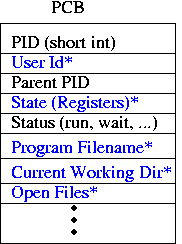
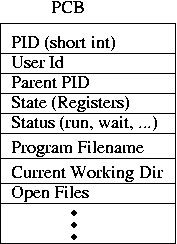
A process consists of all the state needed to run a UNIX program. Some of this state is stored in the CPU registers and the allocated memory. The kernel also maintains a Process Control Block (PCB) for each process (Linux calls this a task_struct; it’s defined in sched.h). (View Highlight)
The PCB contains all the internal state that the kernel uses to provide the process abstraction, including a list of open files, the user ID that the process is running as, and scheduling information. The PCB is not directly accessible to user programs (View Highlight)
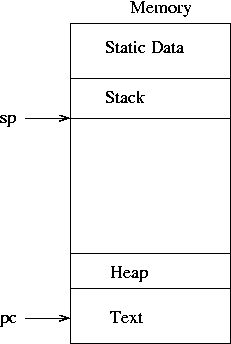
The text segment is the UNIX term for the program’s code in machine language. (View Highlight)
Any process can create a new process by making a request to the kernel. (View Highlight)
The function of fork(2) is to create an almost exact duplicate of the process that calls it. So, if we had the above diagram before the process invoked the fork syscall, then the diagram afterward would look like:
(View Highlight)
Most fields of the PCB are copied from the original to the newly created PCB; they are starred and shown in blue above (we’ll call the new process the child and the old the parent from now on). The parent’s memory is also copied [2]. Note that the PC of both processes is exactly the same. (View Highlight)
Eventually, the kernel will get around to running these two processes. (Which one first? That’s undefined; either could run first.) (View Highlight)
The processes are both exactly the same. When the kernel runs one, it’ll do some stuff (whatever the instructions after the fork tell it to do). Then, when the other one runs, it’ll do…the exact same thing. That’s not too useful. (View Highlight)
The return value of the fork syscall will be 0 in the child process, and will be greater than 0 in the parent. We can use this to have the parent take one code-path while sending the (almost identical) child down a different path. (View Highlight)
immediatly after executing a fork:
• There are 2 processes that are exactly the same, except for the differences described in the fork(2) man page.
• Both processes are at the same line of code (the line immediatly after the fork).
• In the child process, the return value of the fork is 0.
• In the parent process, the return value of the fork is greater than 0. (View Highlight)
The child uses another syscall, exec(3), to replace itself with the mail program. exec does not create a new process; it just changes the program file that an existing process is running. (View Highlight)
exec first wipes out the memory state of the calling process. It then goes to the filesystem to find the program file requested. exec copies this file into the program’s memory and initializes register state, including the PC. (View Highlight)
exec doesn’t alter most of the other fields in the PCB (View Highlight)
At this point we’ve still got two processes, but now one (the parent) is the shell, and the other (the child) is mail(1). The kernel will run both of them, making sure each gets a bit of processing time. It is likely the case that the shell wants to wait for the mail (child) process to finish before doing anything else; it can tell the kernel this using the wait(2) syscall. (View Highlight)
Most modern systems do not actually copy all the memory when fork is called. Instead, they play a little trick to be lazy (remember, lazy is always good). They have the mapping functions for both the child and parent process point to the same memory until such time as one of them makes a change. Only when a change is made does the system copy the memory. (View Highlight)
The PCB is private to the kernel, so the shell couldn’t actually directly set the values. It can, however, use a variety of syscalls to alter them in controlled way (View Highlight)

 (View Highlight)
 (View Highlight)